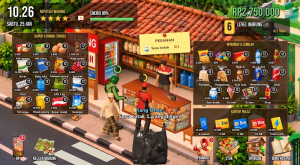

Tip behind the counter and discover just how much enters into running a neighbourhood store. Warung Life Simulator integrates client service, buying decisions and village life with a household story that offers your progress a function.
For gamers checking out Warung Life Simulator MOD, this homepage combines the video game’s main features, useful starting pointers and download details. Discover what occurs throughout a working day, decide how to approach expansion, and be familiar with individuals beyond your store front.
A Shop with a Household Goal
Established by NeoPaw Studio, Warung Life Simulator happens in Cianjur. You play as Pak Misran, whose store supports his ambition to spend for his child Agus’s college education. Company progression and family members obligations develop alongside one another.
That facility offers gamers a factor to believe past the following sale. As you overcome the game, approach each service choice with two inquiries in mind. What does the shop requirement today, and what will aid it support the next phase of the trip?
Check Out the Key Gameplay Features
Stock Getting and Everyday Sales
The shop-management loop entails buying supplies via an in-game phone, receiving deliveries and preparing acquisitions for clients. Rates and stock levels become part of your duties.
Begin by discovering where items sit and exactly how orders are put together. View which things customers demand throughout your very first sessions. Maintaining your interest on those patterns gives you a valuable starting point for deciding what to reorder and just how much cash to preserve.
Client service at the Counter
Packing orders is a hands-on component of the video game. Take a moment to understand the controls, then practice handling a complete transaction from the very first demand to the last payment.
Aim for a constant sequence of actions. Read the order, recognize the items and finish the purchase before transforming your interest elsewhere. Experience with that routine makes the counter simpler to take care of as you end up being extra comfortable with the video game.
Shop Improvements and Growth
Progression consists of shop degrees, added merchandise and tools such as display cases, fans and QRIS repayments. The altering shop gives a noticeable record of your growth.
Pick your next improvement around a clear objective. You might intend to organise your trading day, widen the products you sell or work in the direction of a certain job. Making one purposeful modification each time aids you comprehend just how it matches your larger plan.
A Town to Check out
The setting includes neighborhood sites, homeowners and side activities. The designer’s Application Shop summary consists of angling, collecting fruit and tackling additional work around the town.
Make use of a trip outside the store to focus on a specific task. See a person connected to your current objective or hang out discovering a path. Returning to familiar locations can aid you develop a clearer picture of how the town meshes.
Personality Stories and Personal Progression
Agus’s education forms part of the main narrative, while citizens bring their own tales right into the experience. Development additionally presents additional individuals, items and occasions.
Give conversations your interest when you experience them. Maintain a short note of a character’s request and your following designated action. That tiny routine makes it easier to return after a break and remember what you were working towards.
Build a Routine for Your Initial Procedure
A successful beginning begins with understanding the common jobs. Invest your opening sessions discovering the order of procedures and coming to be aware of the interface. Check out the information available on the in-game phone and link each device with the task it assists you complete.
Set on your own one workable goal for every play session. You might concentrate on serving orders, finishing a specific purpose or discovering exactly how buying impacts your money equilibrium. A focused objective offers you something beneficial to evaluate prior to you quit playing.
When you finish, take a moment to note your next top priority. Record the item you mean to get, the homeowner you intend to check out or the job you want to continue. On your following go to, you can begin with a clear direction.
Strategy Your Costs Prior To Broadening
Treat your offered money as a resource with several jobs to do. Think about restoring products, fulfilling present dedications and conserving for renovations. Prior to a huge purchase, take a look at what you will certainly require for the following trading period.
Prevent picking an upgrade entirely because it is the next noticeable alternative. Read its summary and connect it to the means you wish to develop the shop. A clear reason for spending makes progression much easier to examine.
Contrast your outcomes over a number of sessions. One hectic stretch can feel excellent, yet a regular routine offers a far better basis for your next choice. Keep your plans straightforward sufficient to adhere to while you discover.
Features Presented in Variation 1 2
The variation 1 2 release notes define a benefit schedule, the one-minute Adu Laris marketing obstacle and Kode Warung backup performance. They also state automated saving throughout gameplay.
Use launch keeps in mind as a guide to what you want to try following. Choose one addition, locate its guidelines and learn exactly how it fits into your routine. Checking out changes individually provides you time to comprehend them before moving on.
Maintain a document of the version you are playing when talking about a function with other players. It gives your concerns and monitorings practical context.
Warung Life Simulator MOD Download Information
When examining a download page, keep the version number, launch date, system and specified functions together. Review the setup guidelines before starting, and match the plan details with the device you mean to use. Save that information alongside your download so you can recognize the launch later.
For the programmer’s edition, the game has listings on Google Play for Android and the Application Store for apple iphone and iPad. Google likewise gives a PC listing with Google Play Gamings.
To get ready for installation, follow this sequence.
- Open the listing for your device.
- Inspect the video game title and programmer details.
- Check out the listed system and storage space requirements.
- Complete installment with the store.
- Open up the video game and follow its intro.
- Familiarise on your own with motion, the counter and the in-game phone.
Before your first longer session, adjust the device’s quantity and choose a comfortable location to play. Provide on your own enough time to read the opening guidelines and try the basic interactions at your own pace.
Often Asked Concerns
What Sort of Game Is Warung Life Simulator?
It is a shop-management simulation with town exploration and a family members story. Your tasks combine running business with adhering to goals and conference neighborhood personalities.
What Should Beginners Learn First?
Start with the counter, buying procedure and details revealed on the in-game phone. Practise the fundamental trading routine prior to planning a bigger development.
Exists More to Do Away from the Shop?
The designer defines village expedition, personality communications and activities such as fishing and side jobs. These give various other means to spend time within the setting.
Where Can I Comply With the Programmer?
Modyolo preserves a web site connecting to its video game listing and get in touch with information.