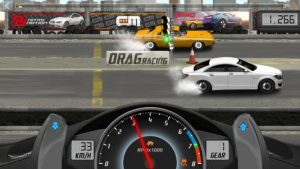

Created a lorry you want to drive, pick a location, and hang out on the road with good friends. Drag Drive Simulator brings autos, motorcycles and social driving right into a Roblox roleplay experience developed by ADV Gamers Team.
This homepage gathers Drag Drive Simulator MOD info along with an introduction to the game, vehicle-building concepts and functional configuration support. Begin with a task that interests you, then work towards a garage and driving regular that reflect your own choices.
Choose What You Want from Your Session
A clear idea makes it less complicated to select your first activity. You might invest an evening exploring, concentrate on a custom-made develop, or meet buddies for an intended drive.
These objectives can overlap. A lorry you customise during one check out can end up being the centrepiece of a team meet during the following. Maintaining a small strategy provides each session instructions while leaving room for spontaneous discoveries.
Get to Know Drag Drive Simulator
The experience is likewise determined as DDS and RDID Overhaul in its summary. The creator provides it as a place for driving and roleplaying with close friends.
Begin by exploring the interface and the cars offered in your session. Locate the controls connected with activity, car option and the menus you expect to make use of frequently. Take your time coming to be aware of the design prior to arranging a longer task.
On your initial drive, choose an easy location. Notice just how the vehicle responds when you speed up, guide and stop. Learning those basic actions provides you a foundation for taking pleasure in the rest of the experience.
Give Your Automobile a Clear Design Instructions
Automobile customisation is a feature of the released function list. The Beta v 1 2.0 description consists of edges, body materials, accessories and flexible backfire results.
A strong design starts with a handful of options that collaborate. Choose a main colour, decide which information must stand out, and select a surface that matches the general look. A refined build can concentrate on the car’s shape. A more meaningful design can make use of brighter accents and unique accessories.
Review the lorry from numerous angles before making the next modification. A mix that looks well balanced from the side may really feel various from the front or rear. Screenshots are useful for comparing options and remembering a design you may take another look at.
Strategy Purchases Around One Build
Pick a lorry project prior to making a collection of acquisitions. Jot down the changes you desire and put them in order of value.
That order can reflect your own top priorities. You could begin with the part that defines the appearance, then work through smaller sized information. An additional gamer could choose to end up being comfy driving the automobile prior to personalising it.
Keep the next purchase attached to a certain goal. This makes each step simpler to value and assists your finished build feel systematic.
Make Driving Practice Part of the Fun
A short, acquainted path is useful when you are learning a vehicle. Choose recognisable spots for the begin and surface, then take note of one aspect of the drive at a time.
During the very first attempt, concentrate on steering. On the next, focus on slowing down smoothly and coming close to corners. When the path really feels comfortable, try a different vehicle and observe how your inputs need to alter.
You can likewise make practice social. Welcome a good friend to follow the very same route and go over which sections really felt easiest. Keep the activity unwinded enough that both players have time to learn and appreciate the environments.
Transform a Group Drive into a Shared Task
A successful satisfy begins before anybody triggers. Settle on the conference area, the path and a location to collect yourself. Give everyone sufficient time to pick an automobile and become ready.
Maintain the very first trip convenient. A neighboring destination makes it less complicated for individuals to remain with each other and understand the strategy. At the stopping factor, take time to take a look at every person’s cars and exchange concepts.
For another session, try a simple theme. Individuals might bring vehicles in matching colours, select contrasting layouts, or introduce a construct they have actually lately completed. Changing the style provides familiar activities a fresh function.
Check out the Towing and Map Update
The maker’s Beta v 1 2.0 notes define a functioning motorbike towing hitch, a motocross off-road track in the Surakarta development, added lorries and changes to the radio system. Statistics and Songs Radio are also called as phone applications.
Pick one addition to explore at a time. Read its summary, locate the appropriate controls and take a few mins to recognize how it suits the game.
When contrasting notes with pals, state the upgrade or include you are going over. That context assists everyone adhere to the conversation and makes your observations more useful when you return to the task later.
Exactly How to Beginning Playing Through Roblox
Open Up the Drag Drive Simulator experience page and check that ADV Gamers Group is shown as its developer. Select Play to release it through Roblox.
For computer system customers, Roblox’s support directions describe that picking Play from an experience web page begins the gamer installation or launches the installed application. Adhere to the system’s prompts to complete that procedure.
Prepare your very first session with this brief list.
- Check in to your Roblox account.
- Open the experience web page.
- Testimonial the video game description and update heading.
- Release the experience using Play.
- Learn the noticeable activity and vehicle controls.
- Select one activity to attempt prior to expanding your strategies.
On a mobile device, testimonial Roblox’s released system demands when preparing your installation. Keep the Roblox application upgraded through its supported circulation network.
Stay up to date with Car and Function Adjustments
Use the experience summary as your beginning factor for update information. Review what the designer has actually added, after that choose which change matters most to the means you play.
Preserve a tiny record of your existing projects. A screenshot of your vehicle and a note regarding the following information you wish to change can be sufficient to proceed later on.
After an upgrade, take another look at the menus you utilize regularly. Familiarise yourself with their arrangement prior to an intended satisfy or team drive. Offering yourself that time helps the next session begin smoothly.
Often Asked Concerns
What Should I Prepare for a Team Drive?
Pick a location, agree on where to meet and let everyone understand the strategy. Offer individuals a moment to finish selecting their vehicles prior to triggering.
What Can I Focus on as a New Player?
Start with vehicle controls and a brief route. Once you really feel comfortable driving, check out the customisation alternatives and pick a little job.
How Can I Give My Build a Clear Design?
Pick a major colour and one detail to emphasise. Contrast adjustments from a number of angles and utilize screenshots to keep in mind the combinations you such as.
Where Should I Check Out Update Info?
Check the description on the developer’s Roblox experience page. Make use of the upgrade heading and provided additions to direct what you check out following.